
More than 4.4 million businesses worldwide use Shopify to power their online stores. If you’re thinking about launching an online business or migrating from another platform, you’ve probably seen Shopify mentioned everywhere. But understanding the hype and knowing whether it actually fits your specific situation are two completely different things.
In our work with ecommerce clients, we’ve seen Shopify work brilliantly for some businesses and create unexpected headaches for others. The difference isn’t the platform. It’s whether the business matched their needs to Shopify’s actual capabilities.
This article walks you through what Shopify actually does, how the pricing really breaks down in practice, how to get your first store up and running without getting stuck, and what the genuine benefits look like when you’re actually running operations. By the end, you’ll know exactly whether a Shopify store makes sense for your business or whether you need something else entirely.
What Is Shopify and How It Works
Shopify is a hosted ecommerce platform. Think of it like the difference between owning a building and leasing space in a mall. You don’t manage servers, security patches, or infrastructure. Shopify handles all that. You focus on products, customers, and selling.
The platform launched in 2006 and has grown substantially since then. It powers everything from one person side hustles to established brands doing millions in annual revenue. Some people run stores as their full time job. Others use Shopify to sell alongside their main business.
From a practical standpoint, this hosted model removes huge operational headaches. Your store stays online even during traffic spikes. Security updates happen automatically. You’re not waking up at 3am because something crashed. The trade off is you pay recurring fees and have less low level control than you’d have with a custom built system.
The core idea is simple: you add products, customers browse and purchase, money goes to your account, and you ship orders. But getting from zero to a functioning profitable store requires more than just setting up a Shopify account. You need good product descriptions, professional images, a reasonable marketing plan, and some thought about how you’ll handle operations.
Key Features of Shopify Stores
Shopify gives you a lot of functionality out of the box. Let’s walk through what actually matters for running a real business.
Product Management That Works
You can add as many products as you want. For each product you add basic information like title, description, images, and price. You also set the cost so you know your profit margins. Shopify lets you create variants for things like size and color so customers can pick their options at checkout.
The inventory system tracks stock levels. You can set it to automatically adjust quantities when someone buys or manually track it yourself. If you’re selling from multiple locations, you can manage inventory at each location separately.
One thing we commonly see is merchants listing products with weak descriptions. They think one sentence is enough. That doesn’t work. You need to explain what the product is, what problems it solves, what materials it’s made from, and why someone should buy it instead of from a competitor. Good descriptions increase conversion and reduce returns.
Managing Customers and Building Relationships
Shopify stores give you a complete database of everyone who’s bought from you. You can see their purchase history, what they spent, their location, and any notes you add. This becomes valuable because you can segment your customer base for targeted campaigns.
Most stores focus on acquiring new customers and overlook the existing ones. But your repeat customer rate and average order value from existing customers is usually where the real profit is. Shopify’s customer tools make it easy to identify your best customers and treat them accordingly.
Order Management and Fulfillment
Every order shows up in one place regardless of where it came from. You can see details, print shipping labels, process refunds, and track what’s been shipped. The system handles the basics well.
If you’re doing high volume, you’ll eventually want a dedicated order management system that connects to Shopify. But starting out, the native tools are sufficient. You can add notes to orders, apply discounts, and communicate with customers directly from the order page.
Email and Basic Marketing Tools
Shopify includes email capture and abandoned cart recovery. You can create discount codes and gift cards. There’s a basic email tool for sending campaigns. This functionality is not as sophisticated as tools like Klaviyo, but for many stores it’s enough to get started without paying for additional software.
Analytics and Performance Data
You get built in dashboards showing traffic, conversion rates, average order value, and top selling products. This gives you a baseline understanding of how your store is performing. For serious merchants, they connect Google Analytics and use more specialized tools. But when you’re starting out, Shopify’s native analytics are helpful for spotting obvious problems.
Security and Compliance Handled
Shopify manages SSL certificates, PCI compliance, and regular security audits. These are things you’d have to figure out and pay for yourself on a custom platform. For a small business, that could cost thousands to implement properly.
Understanding Shopify Pricing Plans
This is where many people get surprised. Shopify operates on a subscription model plus transaction fees. Your actual cost depends on your sales volume and what features you need.
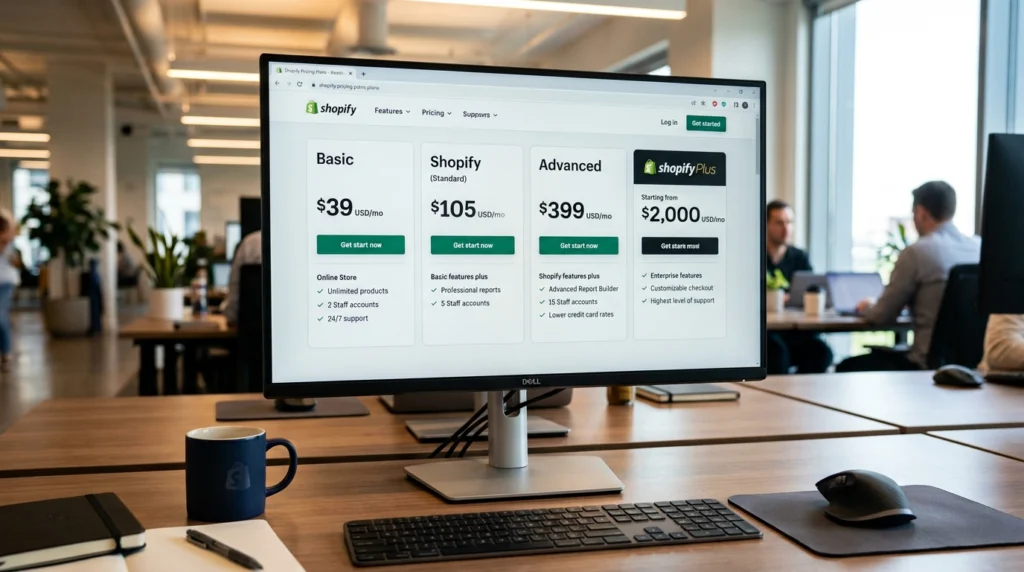
The Monthly Plans
Shopify offers several subscription tiers. Each one includes more features and supports more staff members as you go up.
The Basic plan runs about $39 monthly. You get core features like unlimited products, up to 2 staff accounts, and access to most of the app marketplace. You can create discount codes and handle basic marketing. This plan works well for people just starting out or testing a new product idea.
The Standard plan costs around $105 monthly. You get everything in Basic plus automated discount codes, gift cards, advanced reports, and higher API rate limits. You can add up to 5 staff members. This tier makes sense once you’re getting consistent orders and need better reporting.
The Advanced plan is $399 monthly. You get all previous features plus multi currency selling, advanced automation options, and enhanced reporting dashboards. You can have up to 15 staff accounts. This works for established stores doing significant volume.
Then there’s Shopify Plus which is a custom enterprise product for high volume merchants. Pricing starts around $2000 monthly and goes up from there. This is for businesses processing millions in annual sales.
Transaction Fees Add Up
Here’s the part people often miss: you pay fees on every sale even if you’re paying a monthly subscription.
If you use Shopify Payments, you pay 2.9 percent plus 30 cents per transaction. So on a $50 sale you’d pay $1.45 plus 30 cents which equals $1.75 in fees.
If you use another payment processor like Stripe or Square, Shopify still takes 2.0 percent plus 30 cents on top of what the processor charges.
Let’s look at a real example. You’re on the Basic plan paying $39 monthly. You’re doing $5000 in sales each month. You have roughly 100 orders at an average of $50 each. Here’s what you actually pay:
Monthly subscription: $39. Transaction fees on $5000 at 2.9 percent plus 30 cents per order: about $145 plus $30 equals $175. Your total monthly cost is roughly $214. That’s about 4.3 percent of your revenue.
This actually compares well to other ecommerce solutions. But it shows that Shopify isn’t cheap. It’s affordable and scalable. A really small store pays less in absolute dollars but a higher percentage of revenue. A large store pays more in absolute dollars but a lower percentage.
Other Costs to Budget
Beyond subscription and transaction fees, expect to spend money on other things.
If you don’t like a free theme, paid themes run $180 to $350 for a one time purchase. Quality themes are worth it because they look professional and include better features.
Apps add functionality but cost money. Essential apps might run $10 to $500 monthly depending on what you need. Something like email marketing, inventory management, or customer reviews will have costs.
If you need custom development work beyond what themes and apps can do, developers charge $2000 to $50000 or more depending on complexity.
Professional product photography is crucial and typically costs $500 to $5000 depending on how many products and how polished you want it.
Paid advertising is separate from Shopify but essential for most stores. Budget for Google ads, Facebook ads, or whatever channels make sense for your customers.
For a realistic store launch you’re looking at $3000 to $10000 to get to a professional level. For a more sophisticated operation with custom features, expect $15000 to $50000 or more.
How to Set Up Your Shopify Store
Getting a Shopify store actually live is straightforward. Here’s how it actually happens.
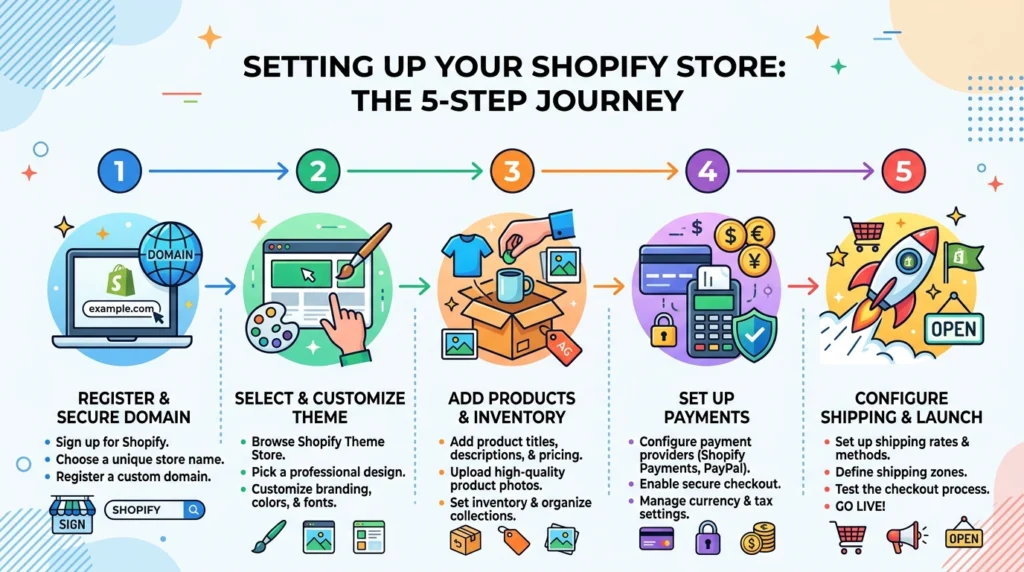
Creating Your Account and Choosing a Name
Go to the Shopify website and start the free trial. You need an email address and a password. Then you pick your store name. This becomes your temporary domain like yourname.myshopify.com. You get three free days to explore before any charges happen.
Choose a store name that’s clear and professional. You can change it later, but it affects how people perceive your brand initially. Don’t spend hours agonizing over the name. You’ll set a proper custom domain next anyway.
Getting Your Own Domain Name
Your Shopify domain works but doesn’t look professional. You want a custom domain like yourname.com or yourbusiness.com. You can buy one through Shopify for about $11 to $14 yearly. Registration takes five minutes. Your actual domain appears in emails, social media shares, and customer emails so it matters for professionalism.
Picking a Theme for Your Store
Visit the Shopify theme store and browse what’s available. Free themes are functional and modern. Paid themes from $180 to $350 typically have more design polish and useful built in features.
The free themes work. The paid themes usually convert better because they look more professional and have smoother customer experiences. If you’re serious about your business, a paid theme is a good investment early on.
Once you install a theme, you customize it. The visual editor lets you change colors, fonts, layouts, and add your own content. No coding required for basic customization. If you need something truly custom, you hire a developer.
Adding Products
Click Products and Add Product. Enter your product title, write a good description, upload quality images, set your price, and input your cost. You can add variants like size or color. Set your inventory level and write an SEO title and description for search visibility.
If you’re moving from another platform or have hundreds of products, Shopify lets you import them via CSV file. But for your first 20 to 50 products, manually adding them forces you to think carefully about how you present each item. That’s actually valuable.
Setting Up Payment Processing
Go to Settings then Payment methods. If using Shopify Payments, verify your bank account. It takes a day or two for them to confirm. If you’re using a different processor, enter your API information.
Shopify Payments is the easiest option if available in your country. It works in the US, UK, Canada, Australia, and several other places. Using an external processor gives you flexibility but adds complexity.
Configuring Shipping
Go to Settings then Shipping and Delivery. Define where you ship, what you charge, and how long items take to ship. You can set flat rates, weight based rates, or use real time rates from carriers like USPS or UPS.
Real time carrier calculated shipping is popular because customers see exact costs. Flat rate shipping is simpler to set up but you might lose money on heavy orders. Most stores use a combination.
Adding Important Pages
Set up your About page, Contact page, and policy pages for Returns, Shipping, and Privacy. These aren’t optional. They build trust and satisfy legal requirements. We’ve seen stores lose conversions because their policies looked sketchy or were missing.
Your navigation menu should be clean. Don’t create more than six or eight main categories or you overwhelm people trying to browse.
Going Live
Once products are added, payment is working, and policies are published, your store is live. But traffic won’t automatically appear. You need marketing which we cover in the benefits section.
For a basic store with 20 to 50 products, you’re looking at 4 to 8 hours of work. A more polished store takes 1 to 3 weeks. The time really depends on how many products you have and how much customization you want.
Themes and Store Customization Options
Your theme is the visual foundation of your store. This deserves real attention because design directly impacts whether people buy.
Free Themes vs Paid Options
Free themes like Dawn from Shopify are modern and work well on mobile. They’re genuinely good. The downside is many stores use the same themes so you look generic. Free themes work if you’re testing a market or bootstrapping with no budget.
Paid themes usually have more sophisticated layouts, better organized features, and smoother interactions. They’re worth the investment if you’re serious about converting visitors. Themes like Prestige, Impulse, and Broadcast tend to work well for stores focused on conversion.
Customizing Your Theme Without Code
Shopify’s visual editor lets you change colors and fonts globally across your entire store. You can adjust your logo, reorder sections like hero banners and product grids, add custom content, hide elements you don’t need, and adjust spacing.
Most people get 85 to 90 percent of the way to their vision through the visual editor. The remaining customizations need someone to write code or a developer to handle it.
Custom Development When You Need It
If you need unique features like custom product recommendations, a bespoke checkout experience, or integration with an outside system, that requires development work. You’re also in development territory if you need specific animations, custom calculations, or performance optimization beyond what a theme provides.
Custom development costs range from $2000 for light work to $50000 or more for complex systems. That investment makes sense once your business is generating revenue to justify it.
From experience, the mistake we see most often is merchants spending heavily on custom design before they’ve validated their product market fit. Build with a solid paid theme, prove your business works, then invest in custom development if the revenue supports it.
Site Speed and Performance Matter
Your theme choice affects how fast your store loads. Some themes are bloated and slow. Others are lean and quick. A slow site loses customers because people won’t wait. Speed also impacts your Google search ranking.
After installing your theme, use Google PageSpeed Insights to check how it actually performs. If it’s slow, you either switch themes or optimize through image compression and app cleanup. Speed is worth attention because each second of delay can drop conversions by noticeable amounts.
Payment Processing and Fees Explained
Payment processing is critical. If it breaks, you can’t accept money and sales stop.
Shopify Payments as Your Primary Option
Shopify Payments is integrated directly into the platform. Money hits your bank account in two to three business days. Chargeback handling is included. It works globally in most countries. The fee structure is transparent: one rate for everything.
The benefits are obvious: simple setup, fast payouts, automatic fraud detection, and one straightforward fee. The limitation is it’s not available in every country and you can’t heavily customize the payment flow.
For most merchants starting out, Shopify Payments is the right choice. It’s simple, reliable, and the fees are competitive with other processors.
Using External Processors
You can integrate Stripe, Square, PayPal, or other processors if you prefer. Maybe you already use one. Maybe Shopify Payments isn’t available in your country.
The trade off is you pay Shopify’s gateway fee of 2.0 percent plus 30 cents on top of whatever the processor charges. So total fees are higher. You do get more control over your payment flow and the ability to brand the experience.
Handling Fraud and Chargebacks
Shopify includes basic fraud detection that flags suspicious transactions. For a store processing $50000 or more monthly, consider a dedicated fraud tool like Kount or Sift Science for advanced pattern detection.
We worked with a store that took $300K in orders over eight months but got hit with chargebacks at 3 percent. That’s about $9K in losses. The owner thought this was normal for retail. It wasn’t. The real issue was selling to high risk countries without extra verification. They implemented address verification and CVV checks. Chargebacks dropped to 0.2 percent. A simple change made a huge difference.
Shopify Apps That Extend Functionality
Shopify’s core platform handles the basics. Apps add specific functionality for specialized needs.
Email and Marketing Apps
Klaviyo handles email automation and customer segmentation. Omnisend combines SMS and email campaigns. KlaviCart focuses specifically on abandoned cart recovery. These tools help you stay in touch with customers and encourage repeat purchases.
Building Trust With Reviews
Stamped.io, Yotpo, and Judge.me all let customers leave reviews and ratings. Social proof from genuine reviews increases conversion. People are more likely to buy when they see others have bought and been satisfied.
Managing Inventory at Scale
Apps like TrackVia, Finale Inventory, and Stock Sync help if your inventory gets complicated across multiple locations or connected sales channels. For small stores with one warehouse, native Shopify inventory is fine. At scale these tools become necessary.
Customer Service Tools
Gorgias creates a unified inbox for all customer support conversations from email, chat, and social media. Shopify Inbox is a native lightweight option that works for simpler needs. Good customer service impacts repeat purchases and brand reputation.
Understanding Performance
Littledata connects Google Analytics properly so you see accurate data. Northbeam shows you which marketing channels actually generate sales so you stop wasting budget on underperformers.
Fulfillment and Shipping
Shipstation manages shipping at scale. Printful handles print on demand so you never touch inventory. Shopify Fulfillment Network connects you with their warehouse partners for storage and shipping.
Realistic App Strategy
Most stores use 8 to 15 apps. But we commonly see merchants install 20 plus apps trying to solve every problem. Then they complain that the store runs slow and costs too much monthly. Each app adds code to your site making it slower. Each app costs something.
Start with 3 to 5 essential apps like email, reviews, and customer support. Validate that each one actually solves a real problem. Add more only as your revenue grows and you have budget.
Real Business Benefits You Actually Get
Now let’s talk about why so many businesses choose Shopify.
Getting Started Is Fast and Inexpensive
You can launch a store in one day with no technical knowledge. Compare that to building a custom site which takes months and costs $20000 or more. Compare it to renting physical retail space at $2000 to $10000 monthly just in rent. Shopify removes the barrier that stops most people from trying.
We’ve seen solo entrepreneurs launch stores in a weekend and do $500 in first week sales. That validation speed matters. You get to test your idea quickly without massive upfront investment.
Your Costs Scale With Revenue
As traffic grows, Shopify automatically scales. You don’t wake up to a crashed server. The infrastructure handles growth. Your cost structure scales with revenue through transaction fees, not against you through infrastructure costs.
Let’s say you grow from $5000 monthly to $100000 monthly. Your Shopify cost goes from about $214 monthly to about $2914 monthly. That’s 4.3 percent at each level. Your operational burden doesn’t spike. With a self hosted solution, scaling infrastructure would be stressful and expensive.
Trust Signals Built In
Shopify as a brand carries weight with customers. They recognize it and associate it with legitimacy. SSL certificates, fraud protection, and PCI compliance are included. This protects shoppers and signals professionalism.
Solid Foundation for Search Visibility
Shopify stores are built on a technically sound foundation. Clean URLs, mobile responsiveness, fast loading when themes are optimized, automatic sitemap generation, and structured data are all included. You’re not fighting the platform to rank in Google.
Important note: A good Shopify setup doesn’t guarantee SEO success. You still need quality content, backlinks, and good user experience. But the platform doesn’t hold you back.
Sell Everywhere At Once
List products on Shopify, Facebook Shop, Instagram, TikTok Shop, Amazon, eBay, and Pinterest from one dashboard. Inventory syncs automatically across channels. Orders consolidate in Shopify for fulfillment.
We worked with a fashion brand doing 40 percent of revenue through Shopify, 30 percent through Amazon, 20 percent through Instagram Shop, and 10 percent direct. Shopify simplified managing all those channels without juggling multiple systems.

Community and Available Help
Shopify has a huge ecosystem of app developers, theme creators, agencies, and consultants. If you need help, dozens of experts exist. If you’re stuck, Shopify’s community forums and documentation are solid. You’re not alone when something doesn’t work.
Professional Email Without Extra Tools
Shopify’s email builder sends transactional emails and marketing campaigns. Automations trigger on purchase, abandonment, or customer milestones. For stores under $50000 monthly, this usually covers your email needs without paying for Klaviyo or Omnisend.
Where Shopify Falls Short
Shopify is powerful but not perfect. Understanding the real limitations helps you decide.
Advanced Customization Gets Complicated
If you need complex logic like tiered pricing based on customer type and order quantity and season, Shopify either can’t do it or you need heavy development work.
A wholesale distributor needed different prices based on customer tier, order quantity, and season. Shopify’s native pricing rules handle simple logic. Beyond that required custom apps or developer work.
Apps Can Disappear or Change Prices
Your store’s functionality depends on third party apps. If an app shuts down or dramatically raises prices, you adapt or migrate. We’ve seen stores built workflows around an abandoned app, then scrambled to migrate to something else.
Limited Checkout Customization
For years you couldn’t customize the checkout heavily without coding. Recent updates improved this with checkout extensions, but you still can’t build a completely custom multi step flow without developer work. Checkout is critical for conversion so this limitation matters.
Blog Features Are Basic
If you’re building a content heavy store like a lifestyle brand, Shopify’s blog tool is functional but clunky. Many merchants integrate WordPress or Webflow for content. This adds complexity.
Inventory Management Has Limits
One warehouse with 100 products works great. Fifty thousand SKUs across ten warehouses with allocation rules doesn’t. You need a dedicated inventory system like Infoplus or Unleashed layered on top.
Subscription Features Feel Bolted On
If you’re running a subscription box or membership, Shopify’s Subscriptions app exists but feels incomplete compared to dedicated tools like Subbly or Bold. Many subscription merchants use a third party tool alongside Shopify.
You Don’t Control Customer Data
Shopify holds your customer data. You can export it but you don’t directly own and control it the way you would with a self hosted solution. For small stores this doesn’t matter much. For large businesses it sometimes does.
Deciding If Shopify Is Right for You
Shopify works well if these things apply to your situation.
You’re selling physical products, digital downloads, or services. You want to launch quickly without managing technical infrastructure. You expect to grow and want infrastructure that scales automatically. You value access to apps and integrations. Your startup budget is $1000 to $50000. You plan to be profitable within 6 to 18 months.
Shopify doesn’t fit if these things are true.
You need complete technical control and ownership of all code. Your business model is highly unusual or complex. You’re building content first more than a store. You need custom checkout or payment flow that Shopify can’t provide. You plan to operate at a loss indefinitely with no clear profitability path.
Other Platforms to Consider
WooCommerce is self hosted, gives you more control, costs less monthly, but requires more technical knowledge. BigCommerce is an enterprise alternative stronger for B2B with more customization. Magento is open source and powerful but steep learning curve and best for large merchants. Webflow is design first, not primarily ecommerce, good for boutique stores with strong design focus.
For 80 percent of merchants, Shopify is the right balance between simplicity and capability.
Your Action Plan to Get Started
If you’ve decided Shopify is the right fit, here’s the actual sequence.
First, talk to your potential customers. Have real conversations with 10 to 20 people. Do they actually want what you’re selling? Shopify can’t fix product market fit issues.
Start the free trial. Build a basic store with 10 to 20 products. Get comfortable with the interface. See what you don’t understand.
Browse themes and pick one that fits your brand. Don’t spend weeks on this. A good paid theme is better than endlessly tweaking a free one.
Write detailed product descriptions. This takes longer than you expect but directly impacts conversion. Be specific about what the product is, who it’s for, what problems it solves.
Configure payments and shipping. Test your own checkout in developer mode before going live.
Launch to your warm audience first. Email people who know you, share on social, reach out to early customers. Validate the concept before spending on paid traffic.
Measure what actually happens. Track conversion rate, average order value, and customer acquisition cost. Adjust based on real data.
Hire help for what you can’t do well. Design, copywriting, marketing, fulfillment. Identify gaps and outsource strategically.
FAQ: Common Questions About Shopify Stores
Is Shopify completely free or do I have to pay?
Shopify gives you a three day free trial. After that you pay a monthly subscription starting at $39. You also pay transaction fees of 2.9 percent plus 30 cents per transaction if using Shopify Payments. So while you can start testing for free, you’ll pay to keep your store running long term.
Can I move my existing store to Shopify from another platform?
Yes. Shopify has migration options for WooCommerce, BigCommerce, and others. You can import products, customers, and orders through CSV files. Complex migrations sometimes need developer help. Most stores take 1 to 4 weeks depending on size and complexity.
How much does running a Shopify store actually cost per month?
Depends on your sales. A $5000 monthly sales store on the Basic plan costs about $39 subscription plus $175 in transaction fees equals $214 total. Add apps at $50 to $300 monthly. Add any custom development if needed. Real monthly costs usually run $500 to $2000 for an active store.
Do I need to hire someone to build my Shopify store?
Not necessarily. Simple stores with under 100 products and standard design can be built by the owner using the visual editor and apps. For custom design, advanced integrations, or high volume operations, a developer or agency adds value. Custom work runs $2000 to $50000.
What’s the best way to get customers to my Shopify store?
Use multiple channels: SEO through blogs and optimized product pages, paid ads on Google and Facebook, email marketing, social media, and word of mouth. Most successful stores mix channels. Start with one, master it, then expand.
Can I sell internationally or in different countries?
Yes. Shopify supports multiple currencies, handles taxes in most countries, and offers international shipping. You set tax rates by location and configure shipping zones. International complexity varies by country. Some locations are simpler than others.
Conclusion
Shopify stores work for hundreds of thousands of businesses because they solve a real problem. They make it possible to launch and scale an online business without needing to become a software engineer.
The platform gives you the features you need like product management, payment processing, inventory tracking, and analytics. It provides reliability through infrastructure that automatically handles growth. It offers simplicity because you can launch in days instead of months.
The cost structure is transparent. Monthly fees plus transaction fees that scale with your business. It’s not free but it’s affordable and fair.
But Shopify isn’t magic. It won’t save a bad product. It won’t fix weak marketing. What it does is remove the technical friction so you focus on the actual business. Finding good products, writing compelling descriptions, acquiring customers, and delivering great service. That’s where the real work is.
If you’re testing a new idea, validating market demand, or scaling an existing business, Shopify stores are a practical and cost effective choice. The biggest risk isn’t the platform. It’s launching without understanding your customer and whether the market actually wants what you’re selling.
Ready to build or improve a Shopify store? Websphere Hub specializes in ecommerce design, store optimization, custom integrations, and digital marketing for merchants at every stage. We help clients launch Shopify stores and increase conversion rates. If you need professional design, technical setup, custom development, or strategic guidance, let’s talk. Reach out to discuss your specific situation or explore our ecommerce services to see how we can help accelerate your business.
